Disclosure: This post contains affiliate/referral links. If you sign up through one, I may earn a small commission or service credit at no extra cost to you. I only recommend gear I actually use. See the full Affiliate Disclosure.
This is the second article in The Agentic RVer series. Read Article 1 here.
AI After 50 — Free Weekly Newsletter
Health discoveries, money opportunities, and life improvements — found by AI, shared weekly.
If you are working remotely from an RV on generator power and your Starlink keeps rebooting, it is not Starlink’s fault. It is your air conditioner. Every time the AC compressor cycles on or off, it creates a power surge that knocks the dish offline for 2-5 minutes. The fix is a portable battery station between your generator and your work equipment. Cost: around $400. This article explains the problem, the math, and the exact setup that solved it.
The Symptom
You are on a Zoom call. Everything is working. The generator is humming outside. Starlink has been solid all morning.
Then the AC compressor kicks on.
Your screen freezes. The call drops. The Starlink app shows “Searching…” with a spinning icon. Two minutes pass. Three. Four. The dish reboots, reacquires satellites, re-establishes the connection. You rejoin the call and apologize.
Fifteen minutes later, the compressor cycles off. Same thing.
Fifteen minutes after that, it cycles back on. Same thing again.
If this sounds familiar, you are not alone. And the problem is not your internet connection.
The Cause: Compressor Inrush Current
Every RV air conditioner uses a compressor — the same type of motor that runs your refrigerator, just bigger. When that compressor starts up, it draws a massive burst of electricity called inrush current. This spike can be 3-5 times the normal running wattage of the unit, lasting only a fraction of a second.
On shore power (a campground pedestal connected to the grid), this spike is absorbed by the electrical grid without issue. You never notice it.
On a generator, it is a different story.
Portable generators — even good inverter generators — have a finite power output. When the compressor demands that inrush spike, the generator’s voltage and frequency momentarily dip or surge. The generator recovers in less than a second. Most appliances do not even notice.
Starlink notices.
The Starlink dish is essentially a computer with an antenna. It runs firmware, manages satellite handoffs, and maintains an active internet session. When it receives a voltage fluctuation — even a brief one — it shuts down and restarts from cold. Full reboot cycle.
The same thing happens when the compressor cycles off. The sudden drop in load causes a brief voltage spike on the generator’s output. Another reboot.
Every cycle of the AC compressor — on and off, on and off, all day — is a potential Starlink outage.
Why This Matters for Remote Workers
If you are camping recreationally, a 3-minute internet outage is an inconvenience. If you are working, it is a professional liability.
Consider what is happening during a reboot:
- Video calls drop completely — you disappear from the meeting
- VPN connections terminate — you may need to re-authenticate
- File uploads fail mid-transfer
- AI terminal sessions (Claude Code, SSH connections) may timeout depending on the operation
- Streaming buffers and restarts
In my setup, my wife and I are both working remotely from our boondocking camp. She is a court reporter on active calls. I am running AI coding workflows and on Teams meetings. A 3-minute Starlink reboot is not a minor glitch. It is a work stoppage that affects two professionals simultaneously.
And it happens every time the AC compressor cycles. In Tennessee heat, that can be every 10-15 minutes.
The Numbers: What Actually Draws Power
Before you can fix the problem, you need to understand the power landscape. Here are field measurements from my setup — not manufacturer specs, actual numbers from daily use:
Starlink + Workstation
| Device | Power Draw |
|---|---|
| Starlink dish (older rectangular panel) | ~40W continuous |
| Laptop | ~30-45W |
| External monitor | ~20-25W |
| Total workstation | ~90-110W |
That is the entire remote office. Under 110 watts. You could run it off a car battery.
RV Air Conditioner
| State | Power Draw |
|---|---|
| Running (compressor on) | ~1,200-1,500W |
| Fan only (compressor off) | ~150-200W |
| Inrush spike (compressor startup) | ~3,000-4,500W for <1 second |
That inrush spike is the killer. For a fraction of a second, the AC demands 3,000-4,500 watts from a generator rated at 4,000-4,500 watts. The generator strains, voltage fluctuates, and everything downstream feels it.
Other High-Draw Appliances
| Appliance | Power Draw |
|---|---|
| Coffee maker | ~900-1,200W |
| Hair dryer | ~1,200-1,800W |
| Curling iron | ~200-400W |
| Space heater | ~1,500W |
| Microwave | ~1,000-1,200W |
Any of these can cause a similar surge if they start up while the generator is near capacity. But the AC compressor is the worst offender because it cycles automatically, repeatedly, all day long.
The Fix: A Portable Battery as UPS
The solution is to put a portable power station between your generator and your work equipment. The battery absorbs the voltage fluctuations and delivers clean, stable power to everything that matters.
My Setup
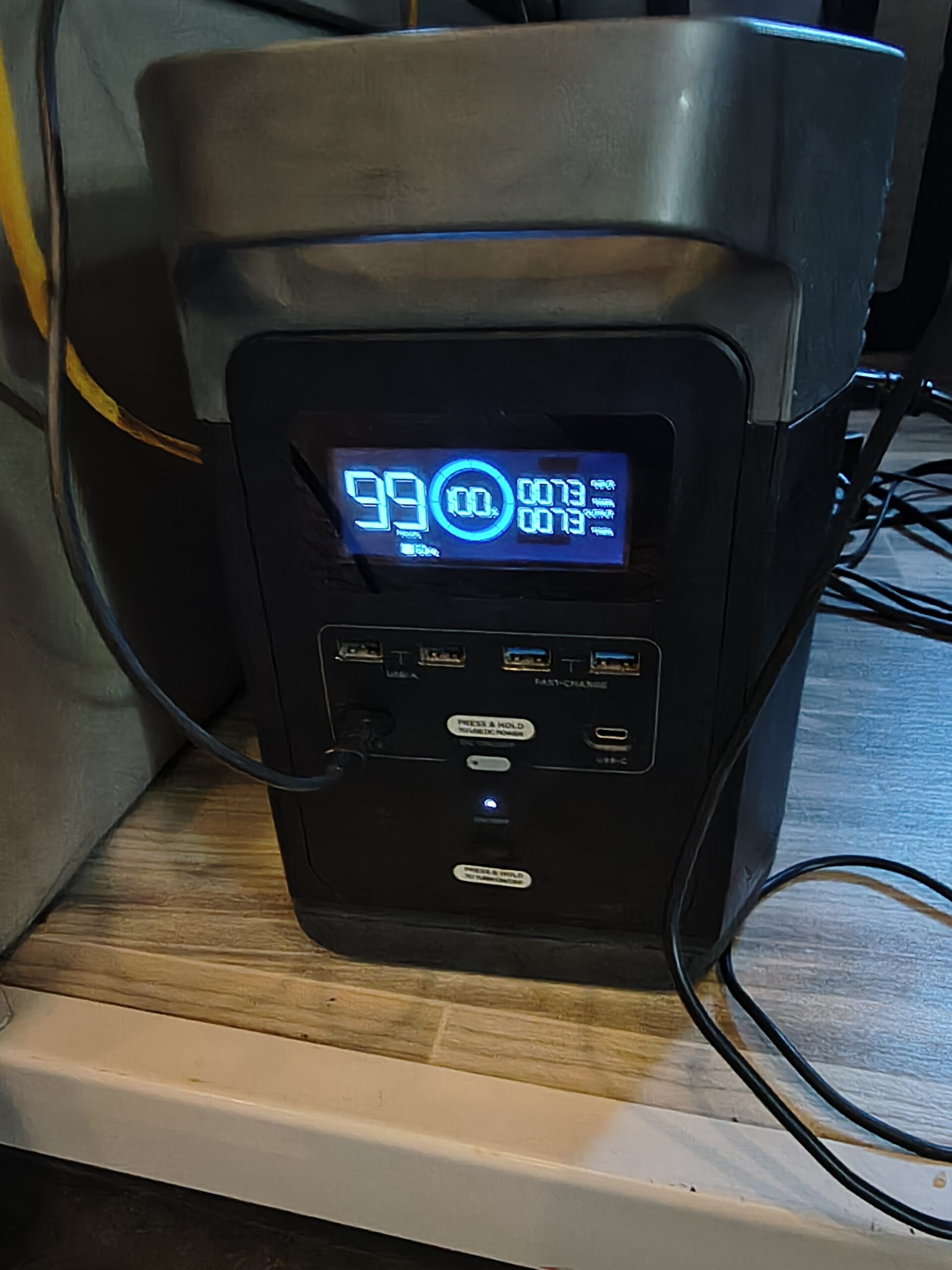
I use an EcoFlow Delta — an older model, roughly 1,200 watt-hours of capacity, about five years old. It cost around $400 when I bought it.
How it connects:
- Generator runs and powers the RV normally (AC, outlets, appliances)
- EcoFlow Delta is plugged into a generator outlet, charging
- Starlink dish plugs into the EcoFlow
- Laptop plugs into the EcoFlow
- External monitor plugs into the EcoFlow
The generator powers the RV and charges the battery. The battery powers the work equipment. When the AC compressor surges, the generator voltage dips — but the battery is between the generator and your gear. The battery does not pass the surge through. It delivers its own stored power at a clean, consistent voltage.
Starlink stays up. Calls stay connected. Work continues.
The Runtime Math
| Factor | Value |
|---|---|
| Battery capacity | ~1,200Wh |
| Workstation draw | ~100W |
| Theoretical runtime | ~12 hours |
| Practical runtime (battery health buffer) | ~5 hours |
I charge the EcoFlow every morning during our “boot sequence” — the first 60-90 minutes when the generator is running for coffee, hair dryer, and morning tasks. By 7:30 AM, the battery is full. It runs the workstation through the morning without the generator. If the generator comes back on for AC at midday, the battery isolates the work equipment from the surges.
By evening, the battery is drained. Next morning, the cycle repeats.
What Size Battery Do You Need?
The minimum depends on your workstation draw and how long you need to run without charging:
| Workstation Draw | 4 Hours | 6 Hours | 8 Hours |
|---|---|---|---|
| 100W (laptop + Starlink) | 400Wh minimum | 600Wh minimum | 800Wh minimum |
| 150W (add monitor + router) | 600Wh minimum | 900Wh minimum | 1,200Wh minimum |
| 200W (dual monitors, printer) | 800Wh minimum | 1,200Wh minimum | 1,600Wh minimum |
For most single-person remote work setups with Starlink, a 600-1,200Wh battery is the sweet spot. Enough for a full morning of work, small enough to charge in 60-90 minutes from the generator.
Alternative Fixes (And Why I Did Not Choose Them)
Soft Start Kit for the AC
A soft start device (like a MicroAir EasyStart) reduces the compressor’s inrush current by ramping up the motor gradually instead of slamming it to full power. This can reduce the surge from 4,500W to under 2,000W.
Pros: Fixes the root cause. Reduces generator strain overall. One-time install.
Cons: Costs $300-500 for the device plus installation if you are not comfortable with electrical work. Does not eliminate the surge entirely — may still cause minor fluctuations depending on your generator. I have not tested this personally, so I cannot confirm it fully solves the Starlink reboot problem.
This is a solid option worth considering, especially if you plan to boondock long-term. But the battery was the faster, cheaper, and more versatile solution — it also provides backup power when the generator is off.
Traditional UPS (Uninterruptible Power Supply)
A rack-mount or desktop UPS (like an APC unit) could also buffer the Starlink.
Pros: Purpose-built for the problem. Many options available.
Cons: Most consumer UPS units are designed for brief outages (5-15 minutes), not hours of runtime. They are heavy, not designed for mobile use, and would need to be recharged from the generator anyway. A portable power station does the same job with more capacity and more versatility.
Running Starlink on Its Own Dedicated Generator
You could run a small, separate generator exclusively for Starlink and work equipment, isolated from the AC load entirely.
Pros: Complete electrical isolation from the AC compressor.
Cons: Now you are running three generators. More fuel, more noise, more maintenance, more complexity. Effective but impractical for most setups.
The Noise Factor
One detail worth mentioning: the EcoFlow Delta is silent. It has no fan when running at low loads like a Starlink dish and laptop. Compare that to the constant hum of a generator.
When I am on a conference call and the generator is off, my work environment is completely silent except for the occasional cardinal attacking the window. That is a meaningful quality-of-life improvement when you are taking professional calls from an RV.
Checklist: Protecting Your Starlink on Generator Power
If you are planning to work remotely from an RV on generator power, here is the setup I recommend:
- Buy a portable power station — 600Wh minimum, 1,200Wh for comfort. EcoFlow Delta, Jackery, Bluetti, or similar.
- Plug ALL work equipment into the battery — Starlink, laptop, monitor, anything that cannot tolerate a power blip
- Plug the battery into the generator for charging — it charges while the generator runs, but isolates your equipment from surges
- Charge the battery first thing every morning — make it part of your daily boot sequence
- Keep the battery above 20% — deep discharge shortens battery life; charge before it gets too low
- Consider a surge protector on the generator output — a Southwire Surge Guard protects against reverse polarity and major spikes
- Consider a soft start kit — a MicroAir EasyStart ($300-500) may reduce the compressor surge enough to eliminate the problem at the source
- Carry a backup internet device — AT&T hotspot, Verizon jetpack, or phone tethering. Redundancy is not paranoia.
The Bigger Principle: Redundancy at Every Layer
This article is about a specific problem — AC surges killing Starlink — but the underlying principle applies to everything in a boondocking remote work setup.
In corporate IT, we design systems with redundancy at every layer. No single point of failure. Failover for every critical component. The same thinking applies here:
| Critical System | Primary | Backup |
|---|---|---|
| Internet | Starlink | AT&T prepaid hotspot |
| Power | Generator | EcoFlow battery |
| Generator | Westinghouse 4500W | Onan 4000W (built-in) |
| Clean power for work gear | Battery (isolates from surges) | — |
If Starlink goes down, the hotspot keeps you working. If the generator fails, the battery gives you 5 hours. If one generator needs maintenance, you have a second.
Anything you rely upon for income needs a failover. That is not a camping tip. That is infrastructure design.
Coming Next in The Agentic RVer
- The 72-Hour Clock — water and waste logistics as a hard work constraint
- Generator Math — the real fuel costs that kill the “cheap nomad life” myth
- The Two-RV Office — why one RV is not enough when two people work full-time
- Mice, Mud, and Meetings — the unautomatable side of remote work
Dominic Ferrara is a Senior IT Manager with 20+ years in defense contracting, currently working remotely from a boondocking camp in Tennessee while running agentic AI workflows over Starlink. He writes about the intersection of enterprise technology, remote work, and off-grid life at dominicferrara.com.
Transparency: Articles on this site are written with AI assistance (Claude Code) and reviewed, edited, and fact-checked by Dominic Ferrara based on personal experience. All data points are from actual field measurements and real-world use.
More From the Agentic RVer Series
- Agentic in the Terminal, Manual at the Spigot
- Generator Math
- The 72-Hour Clock
- Mice, Mud, and Meetings
- AI for RV Road Trip Planning
Get stories like this every week. Subscribe to AI After 50 — free weekly stories from the intersection of AI, health, and real life after 50.